Blog

I’ve been learning an awful lot of Cocoa lately, and to be honest at first I thought the syntax would be somewhat similar to what AS3 is, but apparently I’ve found a massive gap separating between the two.

There are a lot of tutorials and forums out there that can guide you into the right direction and some of them are written by flash aficionados and one of the good one is what the revered Keith Peters has written in his blog, but again as an autodidact programmer reading those tutorials was difficult, what is pointers? why is NSObject? but eventually with much persistence and an occasional mental breakdown, I’ve finally had a grasp on the language.

If you want to follow this tutorial, first ensure you’ve downloaded all of the necessities and also I’m assuming have a decent understanding on AS3 and you’ve had a bit of a tinker with the Xcode otherwise, click here.

What we are about to do is obviously nothing complex, just something to familiarize ourselves with the Objective-C concept.

First open your Xcode and select New Project which will open the New Project panel.
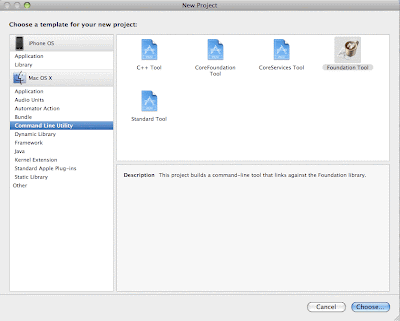
New Project Panel - AS3 to Cocoa Touch part 1
On the New Project Panel under Mac OS X tab select Command Line Utility and select the Foundation Tool.
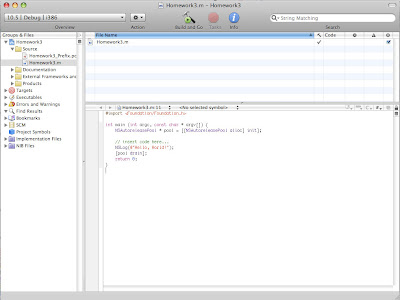
Author Environment - AS3 to Cocoa Touch part 1
If everything went well you should now be at the authoring environment just as illustrated above and open the message file if you haven’t done so, which is denoted by the .m extension.

Objective-C is all about Object Oriented Programming (OOP) and its quite strict as oppose to AS3, creating a class has to be preceded by defining the method(s) and variable(s) on the interface first.

So let’s create a simple interface for MyPet class.

@interface MyPet : NSObject  {
	NSString *petName;
}

- (void) makeSound;
- (void) setName:(NSString*) n;
- (NSString *) getName;

@end

If this is the first time you’ve seen Objective-C it may appear alien at the moment, but let see the AS3 equivalent of MyPet class interface.

package com.farm {

	public interface MyPet {

		function makeSound():void;
		function setName(n:String):void;
		function getName():String;

	}

}

As we can see there are some slight differences, a few elements to note are the NSObject, which is in a nutshell is a base interface, the definition of petName as the class variable and the absent of a package.

Now let’s proceed with the implementation.

@implementation MyPet

- (void) makeSound
{
	NSLog(@"Tweets");
}

- (void) setName:(NSString *) n;
{
	petName = n;
}

- (NSString *) getName
{
	return petName;
}

@end

and the AS3 equivalent.

package com.animal
{
	import com.farm.*;

	public class Bird implements MyPet
	{

		private var _petName:String;

		public function makeSound():void
		{
			trace("Tweets");
		}

		public function setName(n:String):void
		{
			_petName = n;
		}

		public function getName():String
		{
			return _petName;
		}	
	}
}

I think up to this point everything would made sense now and of course Objective-C has a few execution directives we have to follow, such as the @implementation and @end.

Finally the instantiation.

int main (int argc, const char * argv[]) {
    NSAutoreleasePool * pool = [[NSAutoreleasePool alloc] init];

	MyPet *bird = [MyPet new];

	[bird setName:@"Polly"];
	[bird makeSound];

	NSString *birdName = [bird getName];
	NSLog(@"%@",birdName);

	[bird release];

    [pool drain];
    return 0;
}

In here you must be wondering what the main method is doing there. Think about the initial execution inside a document class in AS3, every Objective-C will be initiated with the main method which the compiler will call, passing a few parameters along the way to check the code.

Other elements are the @”Polly” which is just the way you pass string inside Objective-C and NSLog(@”%@”,birdName); which is just an equivalent of trace in AS3 and the most important thing is the [bird release]; method which basically is how the compiler releases the bird instant from the memory, garbage collection is paramount if you trying to build an iPhone application since it has limited resources.

Now run the code by pressing command-return and open the console window to see the output by pressing command-shift-R, if you are correct you will see the bird name and the “Tweets”.

So that’s the end of part 1 there are a lot of things that can be explained here, by I’ll leave it as it so it’s easier to understand.

And the AS3 equivalent.

package 
{
	import com.animal.*;

	import flash.display.MovieClip;

	public class Main extends MovieClip 
	{
		public function Main()
		{
			var bird:Bird = new Bird();

			bird.setName = "Polly";
			bird.makeSound();
			
			var birdName:String = bird.getName();

			trace(birdName);
		}
	}
	
}</code>
and here's the entire code.

<code lang="objc">
@interface MyPet : NSObject  {
	NSString *petName;
}

- (void) makeSound;
- (void) setName:(NSString*) n;
- (NSString *) getName;

@end

@implementation MyPet

- (void) makeSound
{
	NSLog(@"Tweets");
}

- (void) setName:(NSString *) n;
{
	petName = n;
}

- (NSString *) getName
{
	return petName;
}

@end

int main (int argc, const char * argv[]) {
    NSAutoreleasePool * pool = [[NSAutoreleasePool alloc] init];

	MyPet *bird = [MyPet new];

	[bird setName:@"Polly"];
	[bird makeSound];

	NSString *birdName = [bird getName];
	NSLog(@"%@",birdName);

	[bird release];

    [pool drain];
    return 0;
}

Was launched 1 hour ago.

and here’s what people is saying about it.

A series of internet memes has again sparked another heated debates, first it was the first javascript website showcased in the FWA and later the YouTube- HTML5 integration.

Since the dawn of the internet-era, infinite debates amongst these developer elitists were always inundated the World Wide Web and one of the revered topic is of course who has the better developing platform.

The advent of HTML5 and the mission and vision which it carries is truly spellbinding for the internet community, but if you remember so had actionscript 3 during its inception.

Every technology has its share of flaws.

The impending problem that HTML5 has had to be adaptations and compatibility issues, the browser war will always be diluted by strategic marketing, business goals, and of course ego -which can be dubbed as the company ideology- and never in the interest of the developer.

The first HTML5 conundrum which has begun is the new video which its support is limited to web browsers that support the H.264 video codec mainly because W3C declined to specify a standard video codec to go along with new video element and you can guess it, IE deviates the notion completely and this just the beginning of other impediments which will come along.

Flash, as I’ve had mentioned its flaws and the prevalent hate memes such as the CPU hogger, the battery drainer, etc which all is true, and of course the choreographed demo of Flash player 10.1 in Nexus, was mainly caused by Adobe complacent and other aspect which mainly had to be the economy, the decrescendo of demand in Flash during this post-recession period has been abysmally loud (a bit of oxymoron there) and based on my experience, building a good Flash site needs a bit of an investment in time and money as oppose as HTML/JS sites, hence unless if it’s a niche market such as social-game company, almost nobody dares to invest such luxury or even has the needs that requires Flash to fulfill their business objective, except for that annoying ad banners which I mostly am doing now :(.

But from the Technology stand point, Flash I think can still accomplish, and I’m not trying to be subjective here, something that is better than what HTML/JS does, a few sites worth mentioning are:

http://sketch.odopod.com/
http://www.picnik.com/app

I dare you to build something like that with HTML/JS, but again I’m not trying to devalue HTML/JS here, check out google, digg, etc.

But in conclusion these ridiculous dialogs are unfounded, history has repeatedly shown us that technology is merely a tool, a transient breeze that bound to be superseded by a better and in-your-face contender ergo we shouldn’t be trying to be a platform zealots, I’ve been experimenting with Unity3D, Cocoa, Jquery and of course Flash, I think exploring new Technology is the beauty of this keyboard-cat and Rick’n Roll’d era.

As an epilogue I will depart from this post by paraphrasing some guy with a weird hairdo who invented the theory of relativity:

Imagination is more important than knowledge. For knowledge is limited to all we now know and understand, while imagination embraces the entire world, and all there ever will be to know and understand.

The first time I saw this, I’ve never thought that it was a CGI, the whole atmosphere had been flawlessly executed, the models, the textures, and the lightings were perfect.

Kudos for Alex Roman for his unprecedented work and may god bless mediocre achiever like me.

The Footage:

The Third & The Seventh from Alex Roman on Vimeo.

Compositing breakdown:

Compositing Breakdown (T&S) from Alex Roman on Vimeo.

It seems the sky is truly the limit with iPhone, after the surreal augmented reality application, now another one has emerges, although this is not actually an apps but the result is mind blowing nevertheless.

The Mill, which unfortunately I couldn’t find out exactly who they are, had concocted a custom 3D motion trackers which utilizes nothing but the goodness of iPhone capabilities.

watch this first:

and a brief description:

via ProVideo.

Determining the perfect balance between performance and quality was a very tedious experience for me and I was flabbergasted since hours of digging through google I realized that no one has ever documented the mantra (or maybe I was googling at a different direction).

After a few grueling days of publishing, remodeling the 3D (which wasn’t done by me thankfully), sending yet another dubious budget proposal to the client, and watching jagged 3D object floating on my computer screen, I’ve discovered a poly count between 2000 to 5000 has the most perfect mixture between quality and performance, yes the possibilities of adding more polys is feasible but considering that people (especially in the middle east region) mostly owns a mid-range computer platform, this is the most sensible approach.

It’s finally here! but the video is unrelated with launch though. Google Chrome OS has sparks so many controversy but what do you expect it’s Google.

“I think they were being sarcastic when they named it Flash…”

That sentence was spoken by my non-Flash friend, even though he was obviously just making a joke by taking the context out of no where, deep down I was nodding in agreement.

Lately Flash has been slandered by the internet community due to its reputation as the CPU hogger, from twitter across the land of digg, they shout in unison but now a sliver of light has finally shines upon our dark caves as we cower in the face of uncertainty.

Flash finally utilizes the GPU acceleration, NVDIA and Broadcom has team up together to come up with an improvement for everything from Tegra Mids to Broadcom Crystal HD netbooks which has been confirmed by Broadcom that this flashy Flash Player will be available in the first half of 2010 but of course for a Flash Developer a month is regarded as a decade.

Throughout the years Flash has gain an enormous followers who were willing to do everything for the prosperity and the longevity of Flash and almost everybody from the Flash community has been begging adobe to create a faster player but instead they’re more keen to create inane features that were only used by the CSI team and in the dawn of fierce competition from HTML5 and super fast player like Unity3D more and more people are turning away from Flash and heading to a more greener pasture.

I think Flash has to realize that it cannot remain complacence anymore and start fighting if they want to keep themselves on the top.

via Engadget.

If you have been living on the moon and just recently got bombed, you probably haven’t heard the infinite rumors of Flash versus iPhone.

But now the perplexity has finally been answered, a few weeks ago Adobe has presented a demo of Flash Professional CS5 with a native iPhone apps builder!

In a nutshell, what Flash does is compiles the AS3 encoding into native ARM format which can be deciphered by an iPhone, here’s the step by step of the procedure in case you don’t have the time to watch the video:

ABC Extraction & Compilation
AS code is pulled out and compiled by LLVM.
Optimization
LLVM’s global optimizer looks for efficiencies.
Linking
Native ARM version of app linked against iPhone libraries.
Signing
App signed with dev certificate.
Packaging
App and assets placed in an APP bundle then zipped to IPA.

Albeit it has a few imperfections which Flash shares, but I have to admit this is one of the most orgasmic feature that Flash has ever unleashed.

So hopefully as the momentum of the Open Screen Project continues to swing, it will allowes Adobe to keep moving forward and more importantly keeps their humble aficionados, such as myself :D, earning more living.

UPDATE apparently no matter what adobe does apple simply won’t let them in, so forget everything I’ve said above.

The first time I saw Augmented Reality I think when I was 14 years old, it was a footage about an invention in gaming, I remembered it quite clearly it was racing game but with a real desk projected as its terrain, the car was hoping through the books and dodging stationaries as if they were gorges.

And about a year ago Augmented Reality was again dubbed as the zeitgeist of the internet, its so easy to implement in flash, thank you to Saqoosha.

But it didn’t stop there, the zeitgeist continues to permeates to a level that is insanely creative and as I spent my time procrastinating and watching others whizzing through the moon leaving me behind, I’m finally able to immerse my self in Flash Augmented Reality, below, albeit minuscule, is the taste of things to come.

or if you have a webcam, first download and print the marker and go try it out yourself.